
Health
Designing a Reliable Health Check Response Protocol for Modern Systems

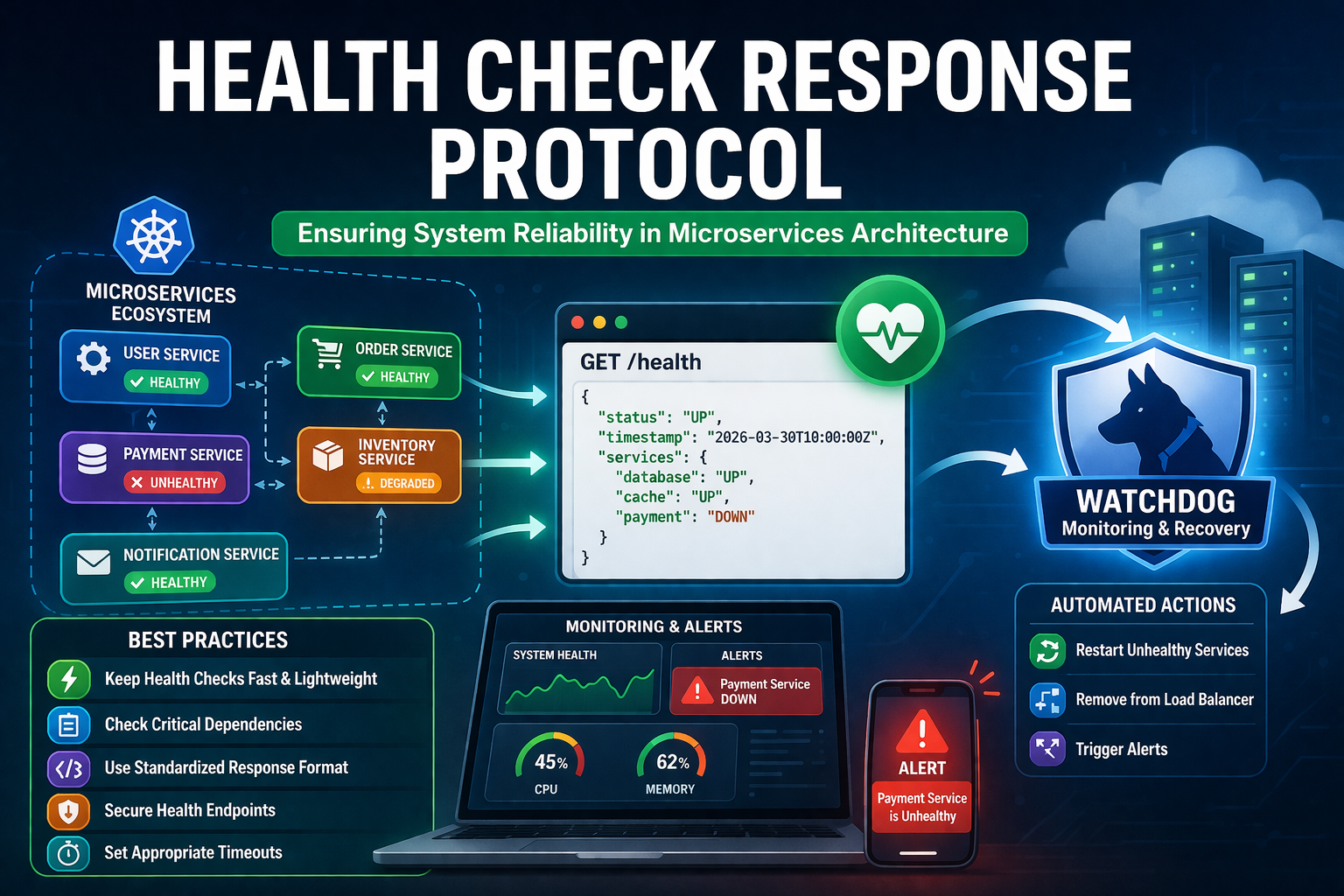
In today’s digital world, applications are no longer simple, single-server setups. Most modern platforms run on distributed systems, especially microservices. In such environments, dozens or even hundreds of services communicate with each other. If one service fails, it can impact the entire system. This is where a well-defined health check response protocol becomes essential.
A health check system helps determine whether a service is running correctly, partially degraded, or completely unavailable. It allows load balancers, monitoring tools, and orchestration platforms to make smart decisions. Without it, systems become blind to failures, leading to downtime, poor user experience, and lost revenue.
This article explains how to design and implement an effective health check system in a simple and practical way, even if you are just starting out.
What is a Health Check Response Protocol?
A health check response protocol is a structured way for a service to report its current status. It defines how an application answers when another system asks, “Are you okay?”
Think of it like a quick check-in at home. If you ask your child, “Are you okay?” and they respond clearly, you feel relaxed. But if there is no response or a confusing one, you know something is wrong.
Similarly, systems use health endpoints (like /health) to return responses such as:
- Healthy (OK)
- Unhealthy (Error)
- Degraded (Working but with issues)
These responses are usually returned in JSON format and include details like database status, memory usage, or external service connections.
Why Health Checks Are Critical in Microservices
In microservices architecture, each service operates independently. While this gives flexibility, it also increases complexity. A single failure can create a chain reaction.
A properly designed health check response protocol helps in:
- Detecting failures early
- Automatically restarting unhealthy services
- Routing traffic only to healthy instances
- Improving system reliability
For example, if your payment service is down, a health check can stop requests from reaching it. This prevents user frustration and avoids cascading failures.
Types of Health Checks You Should Know
Not all health checks are the same. Different situations require different checks. Understanding these types will help you design better systems.
Liveness Check
This check answers one simple question: Is the service running?
If the service fails this check, it usually needs to be restarted.
Readiness Check
This check verifies whether the service is ready to handle requests.
For example, a service might be running but not connected to the database yet.
Startup Check
This is used during application startup. It ensures that the service is fully initialized before receiving traffic.
Each type plays a unique role in maintaining system stability.
Key Components of a Good Health Check System
A strong health check response protocol is not just about returning “OK.” It should include meaningful details that help identify issues quickly.
1. Clear Status Codes
Use standard HTTP status codes:
200 OK→ Healthy503 Service Unavailable→ Unhealthy
2. Structured Response Format
Return data in a consistent JSON format. Example:
{
  "status": "UP",
  "database": "UP",
  "cache": "DOWN",
  "timestamp": "2026-03-30T10:00:00Z"
}
3. Dependency Checks
Check important dependencies like:
- Database connections
- External APIs
- Message queues
4. Lightweight Execution
Health checks should be fast. Avoid heavy operations that slow down the system.
Designing a Simple Health Endpoint
Creating a health endpoint is easier than it sounds. Most frameworks support it out of the box.
A basic endpoint might look like this:
GET /health
When called, it returns:
- Overall system status
- Individual component status
For beginners, start simple. Just check if your service is running and connected to the database. You can improve it later.
Best Practices for Implementing Health Checks
To make your system reliable, follow these practical tips:
Keep It Simple
Do not overcomplicate your checks. Start with basic checks and expand gradually.
Avoid False Positives
A system should not report “healthy” if a critical component is down.
Separate Internal and External Checks
Internal checks can be detailed, but external ones should be lightweight.
Use Timeouts
If a dependency takes too long to respond, treat it as unhealthy.
Log Failures Clearly
Always log why a health check failed. This helps in debugging.
Common Mistakes to Avoid
Many developers make small mistakes that cause big problems later.
Checking Too Many Things
If you check too many dependencies, your health check becomes slow and unreliable.
Ignoring Partial Failures
A service might still run even if one component fails. Ignoring this can hide real issues.
No Standard Format
If every service returns a different format, monitoring becomes difficult.
Overloading Health Endpoints
Health checks should not consume heavy resources.
Role of Health Checks in DevOps and Automation
Health checks are not just for developers. They play a big role in DevOps workflows.
Tools like Kubernetes use health checks to:
- Restart failed containers
- Scale applications automatically
- Remove unhealthy instances
This automation reduces manual work and keeps systems stable without constant human monitoring.
Real-Life Example (Simple Understanding)
Imagine your home setup:
- Electricity = Database
- Internet = External API
- Water supply = Internal service
If electricity is gone, your house cannot function properly.
A good health check response protocol would detect this and say:
“System is not fully operational.”
This simple logic helps systems make smart decisions automatically.
Monitoring and Alerts
Health checks become powerful when combined with monitoring tools.
You can set alerts like:
- Notify when service is down
- Trigger restart automatically
- Send reports to admin
Popular tools include:
- Prometheus
- Grafana
- New Relic
These tools visualize system health and help teams respond quickly.
Scaling with Health Checks
As your application grows, health checks become even more important.
In large systems:
- Multiple instances run at once
- Load balancers distribute traffic
- Failures happen more often
A strong health check response protocol ensures only healthy instances receive traffic. This keeps performance smooth and users happy.
Security Considerations
Health endpoints should be protected.
If exposed publicly, attackers can use them to:
- Discover system structure
- Identify weak points
Best practices:
- Restrict access
- Hide sensitive details
- Use authentication if needed
Conclusion
A well-designed health check response protocol is a small feature with a big impact. It helps systems stay reliable, scalable, and easy to manage.
Start simple, keep responses clear, and focus on critical components. As your system grows, you can make your health checks more advanced.
Think of it like checking on your family at home. A quick, clear response gives peace of mind. In the same way, health checks keep your system running smoothly without surprises.
More Details : Gyatt Meaning: Understanding Its Origins and Significance
FAQs
1. What is a health check response protocol?
It is a method used by applications to report their health status, helping systems detect issues and respond automatically.
2. How often should health checks run?
They usually run every few seconds, depending on system needs and performance considerations.
3. What is the difference between liveness and readiness checks?
Liveness checks confirm the service is running, while readiness checks confirm it is ready to handle requests.
4. Can health checks slow down my system?
If designed poorly, yes. Keep them lightweight to avoid performance issues.
5. Are health checks necessary for small applications?
Even small apps benefit from basic health checks, especially as they grow over time.

Generative AI in GBS: How LLMs Are Transforming Global Business Services

Healthy Food, Smarter Teams: The Productivity Connection

AI Testimonial Video: The Easiest Way to Build Trust and Boost Sales

5 Ways Real Estate Can Support Long-Term Wealth Goals

Stand Out in the Crowd: The Ultimate Guide to Unforgettable Event Merchandise

Why Every Hookah Owner Needs a Quality Shisha Bag

What Does Assisted Living Look Like for Veterans

How Magnesium Gummies Can Support Everyday Wellness

Hair Systems for Men: Your Complete Guide to Confidence

Why Athletes Trust Oakley Over Other Sports Brands?

How AI Helps Brands Create Memorable Jingles and Marketing Songs

How to Propagate a Snake Plant Successfully: Simple Methods That Really Work

AI Glasses for Hands-Free POV: Inside RayNeo X3 Pro’s 12MP Sony Camera

Latest Development Updates of Naval Anchorage Phase 2 Islamabad – What Investors Need to Know (2026 Guide)
Hair Systems for Men: Your Complete Guide to Confidence
Why Athletes Trust Oakley Over Other Sports Brands?

Which Vape Is Good in Germany?

NASA City Lights: How Satellite Images Reveal the Story of Our Planet
What Does Assisted Living Look Like for Veterans
Why Every Hookah Owner Needs a Quality Shisha Bag
Generative AI in GBS: How LLMs Are Transforming Global Business Services
Healthy Food, Smarter Teams: The Productivity Connection
AI Testimonial Video: The Easiest Way to Build Trust and Boost Sales
5 Ways Real Estate Can Support Long-Term Wealth Goals
Stand Out in the Crowd: The Ultimate Guide to Unforgettable Event Merchandise
Why Every Hookah Owner Needs a Quality Shisha Bag
What Does Assisted Living Look Like for Veterans
How Magnesium Gummies Can Support Everyday Wellness
Hair Systems for Men: Your Complete Guide to Confidence
Why Athletes Trust Oakley Over Other Sports Brands?
-

 Tech6 months ago
xxx is equal to 2022: A Complete Informative Explanation of a Cubic Equation
-

 Celebrity6 months ago
Izzie Balmer Partner: A Deep Dive into the Relationship with Will Hawley
-

 Entertainment6 months ago
The Artistic World of Gege Akutami: A Mastermind Behind Jujutsu Kaisen
-

 Entertainment5 months ago
Semana Santa 2026: Dates, Traditions, and Global Celebrations